Beating the best Doodle Baseball score
A vision-only bot for Google's 2019 baseball Doodle: a YOLO ball detector, a pitcher whose hat gives away every pitch, and a small tree model that picks the millisecond to swing. The best human score I could find is 179.
Rishi Thakkar9 min read
For the 4th of July in 2019, Google put a baseball game on its homepage. You're a piece of food holding a bat, a peanut pitches to you, and you press space to swing. That's the whole game. You keep batting until you strike out three times.
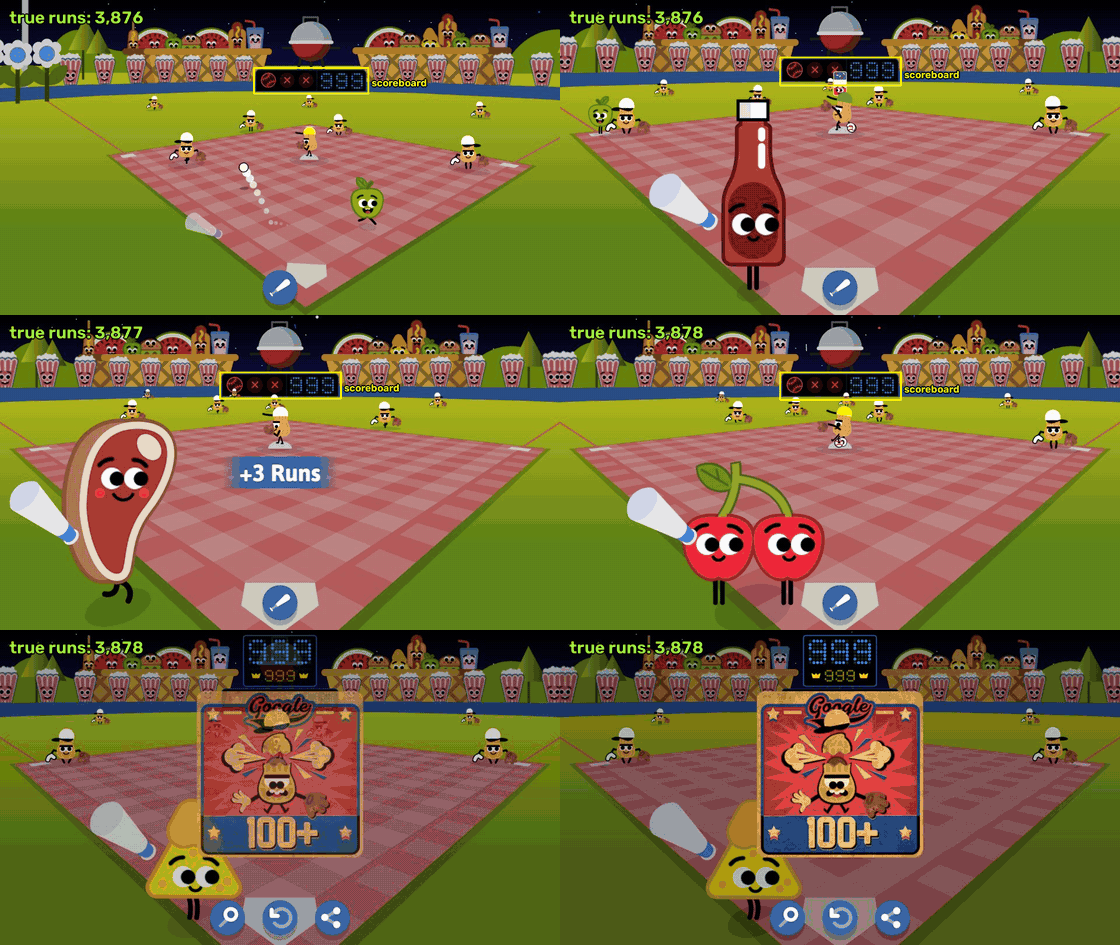
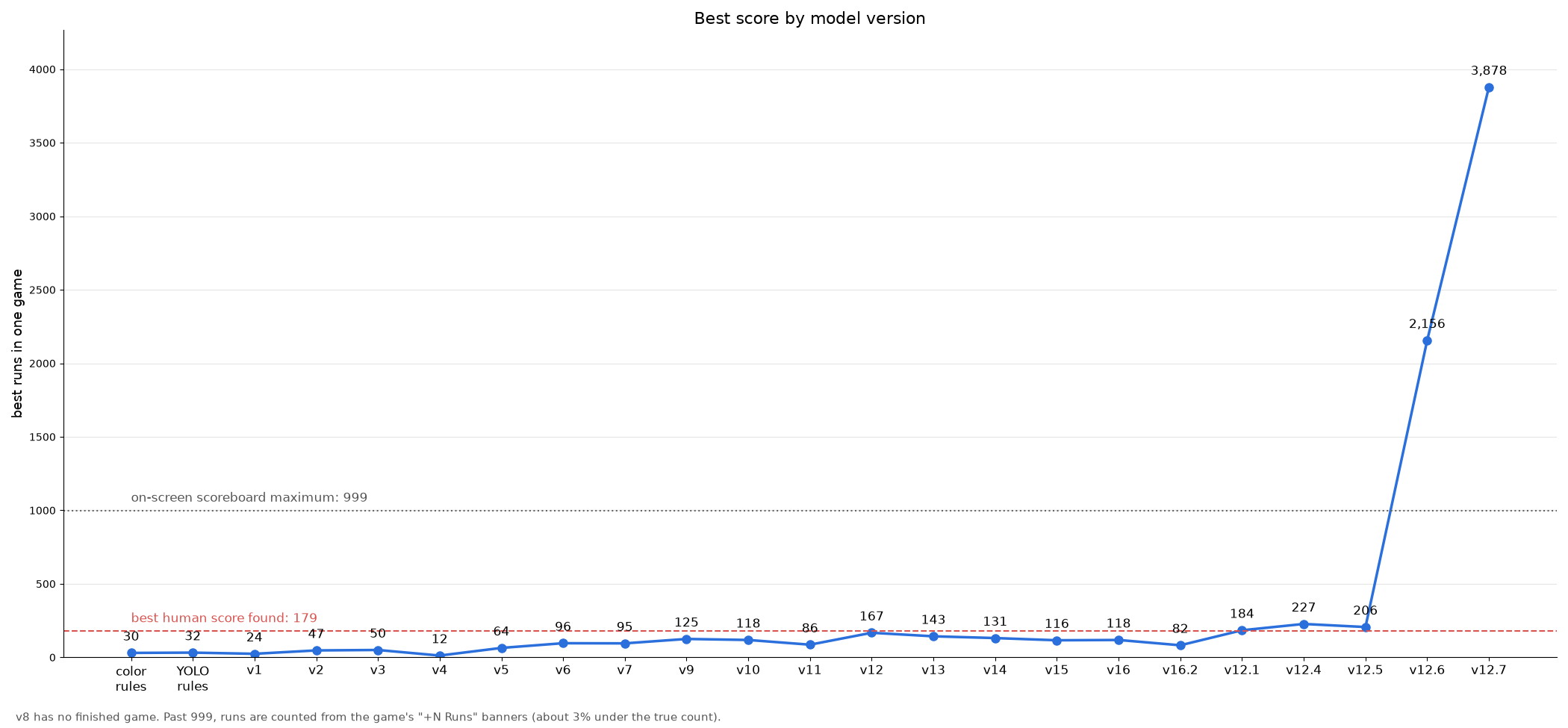
The best score I could find anywhere is 179 runs, on the speedrun.com leaderboard. On my first game, I got about 27, so I built a bot to play it for me instead. Its best game lasted 3.6 hours and scored 3,878 runs over 4,081 pitches.
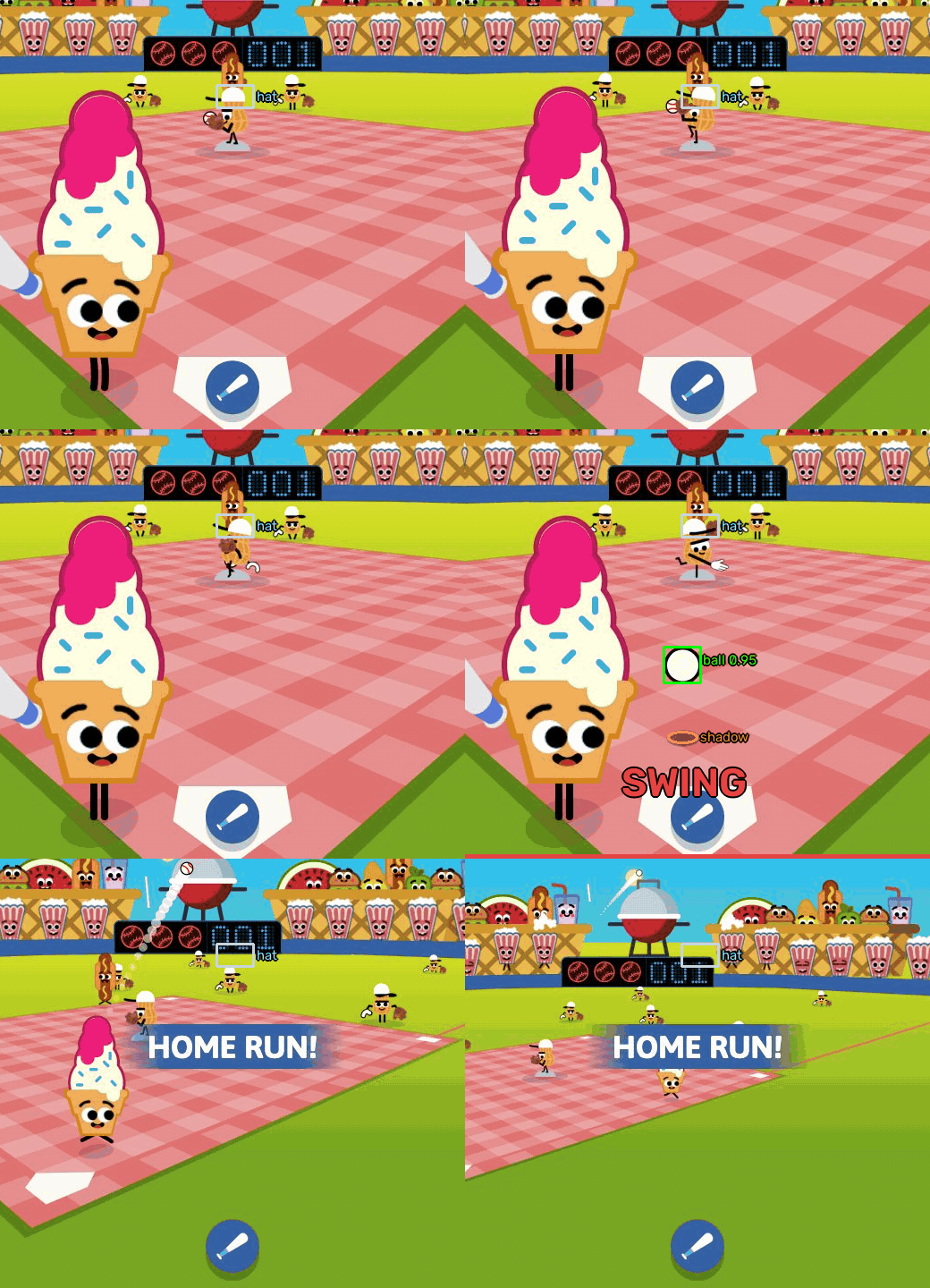
I set myself one rule: the bot only gets pixels. It doesn't read the game's code, peek at its memory or touch its JavaScript. It sees the same 960×540 picture you do, and its only output is the space bar. The code is on GitHub, here.
The setup
headless Chromium ──60 fps screencast──▶ decode frame
   ├─ ball detector (YOLO11n)  ──▶ where is the ball, how big
   ├─ shadow finder (color rule) ──▶ where is its shadow
   ├─ hat reader ──────────────▶ what color is the pitcher's hat
   └─ policy ──▶ predict the swing time ──▶ press Space
A Playwright harness loads the game's own HTML page (no Google homepage around it) in headless Chromium and streams frames over the DevTools screencast API, about 60 a second. Each frame goes to a ball detector, a shadow finder and a scoreboard reader. A policy decides when to swing, and the swing is sent as a raw DevTools key event.
That last detail matters more than it sounds. Playwright's keyboard.press waits for the key to come back up, which put about 40 ms between seeing a frame and swinging. Sending the key-down directly cut that to about 9 ms. Later in the game, that's a big chunk of the hit window.
Finding the ball without labeling anything
I started with a hand-written detector: look for a white, round blob in the area where pitches fly. It works most of the time and needs no training. But it loses the ball whenever it blurs, overlaps something white, or trails behind a breaking ball.
Then I used that rule as a free labeler. I recorded games, let the color rule mark the ball, filled short gaps by fitting the ball's arc, and threw away frames where the position was unknown rather than guessing. That gave me thousands of labels with zero hand labeling, and I trained a YOLO11n detector (2.6M parameters) on a 320×320 crop of the pitch corridor. It runs in 6.5 ms per frame on my Mac's GPU.
The interesting test wasn't its accuracy on held-out games (0.98 precision, 1.00 recall), because that mostly measures agreement with the rule that taught it. It was the frames the color rule missed. YOLO found the ball in 212 of 269 of them (79%), frames it had never seen a label for.
The game cheats, and then tells on itself
Ghost pitches
Early on, most of my strikes came from one kind of pitch. The ball leaves the pitcher's hand, travels a short way, and then fades out completely. No detector can find a ball that isn't drawn.
But its shadow on the tablecloth keeps going.
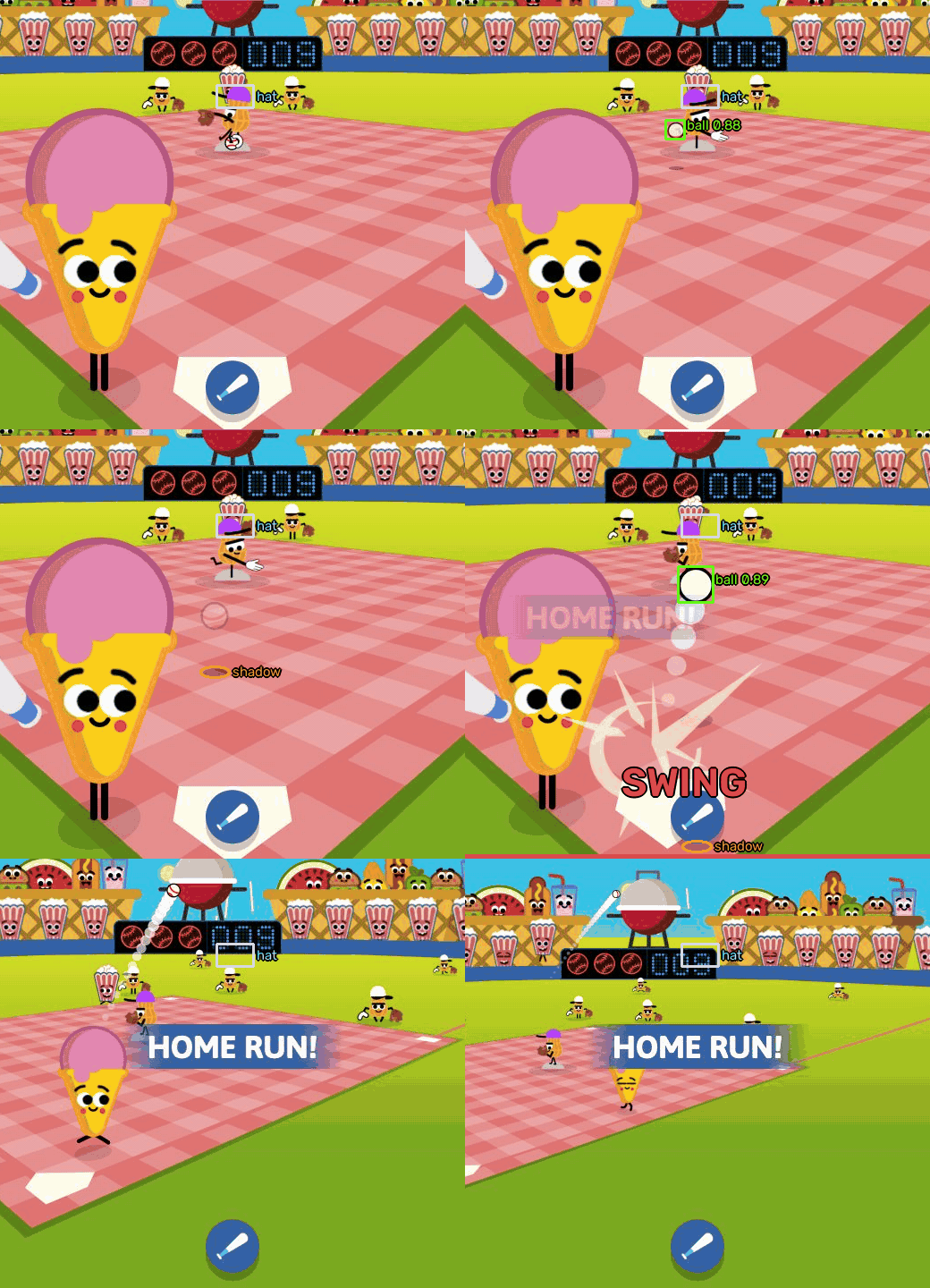
I added a shadow tracker (a color rule: a dark, still-reddish ellipse under the ball) and let the bot time ghost pitches off the shadow. Average runs per game went from about 13 to about 27. And once ghost pitches were handled, the simple color detector scored just as well as YOLO. The detector was never the bottleneck: swing timing matters far more than finding the ball. That shaped everything after it.
The pitcher's hat
The pitcher wears a hat, and its color changes a second or two before each pitch. It turns out the hat tells you exactly what's coming. I checked that on 345 recorded pitches:
- white: a straight pitch
- green: a slow breaking ball that curves left
- yellow: a faster breaking ball
- purple: a ghost pitch
- blue: a high lob that drops in from the top of the screen
- red: a fastball, about 0.25 s from release to the plate
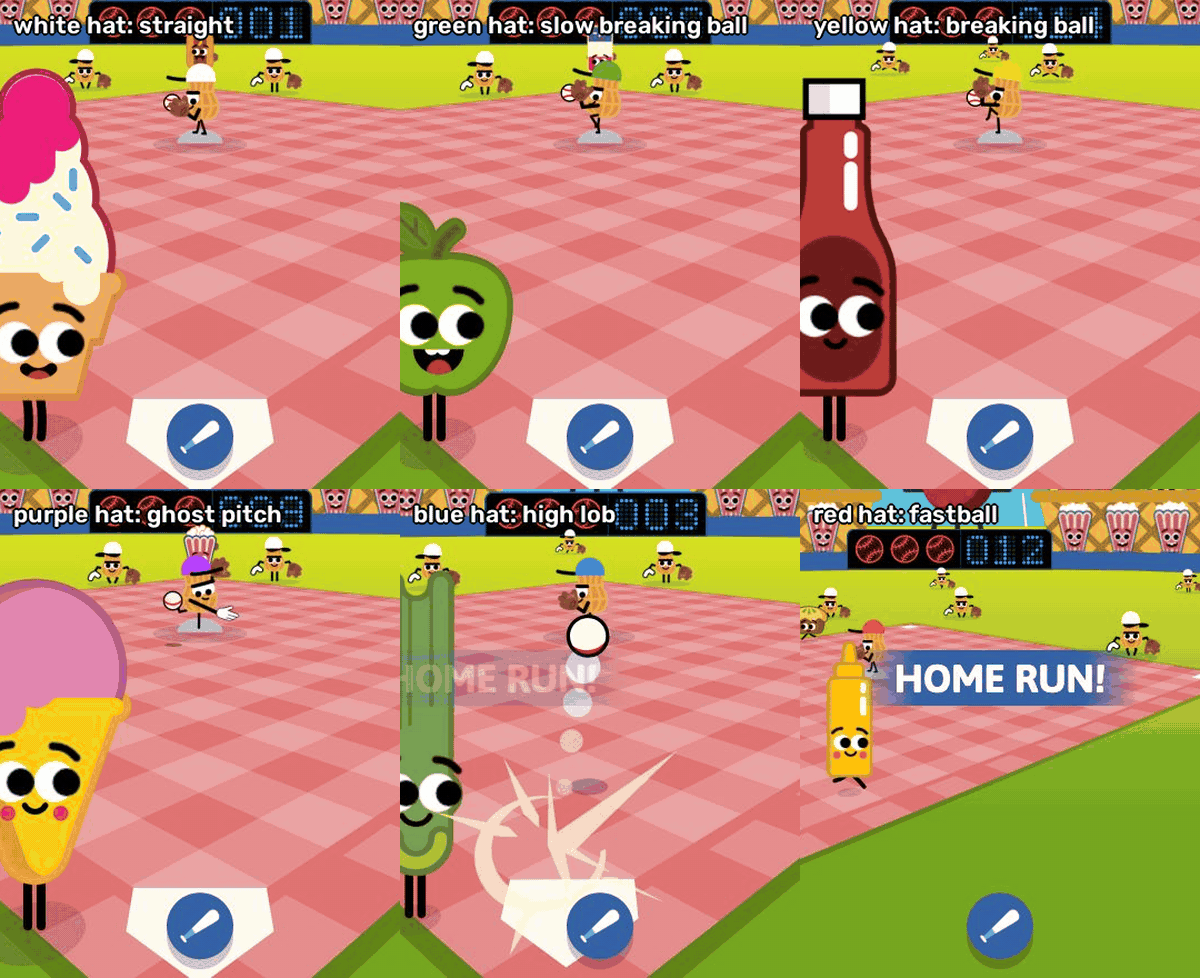
That's a huge gift. The bot can know the pitch type before the ball even leaves the hand.
It keeps speeding up
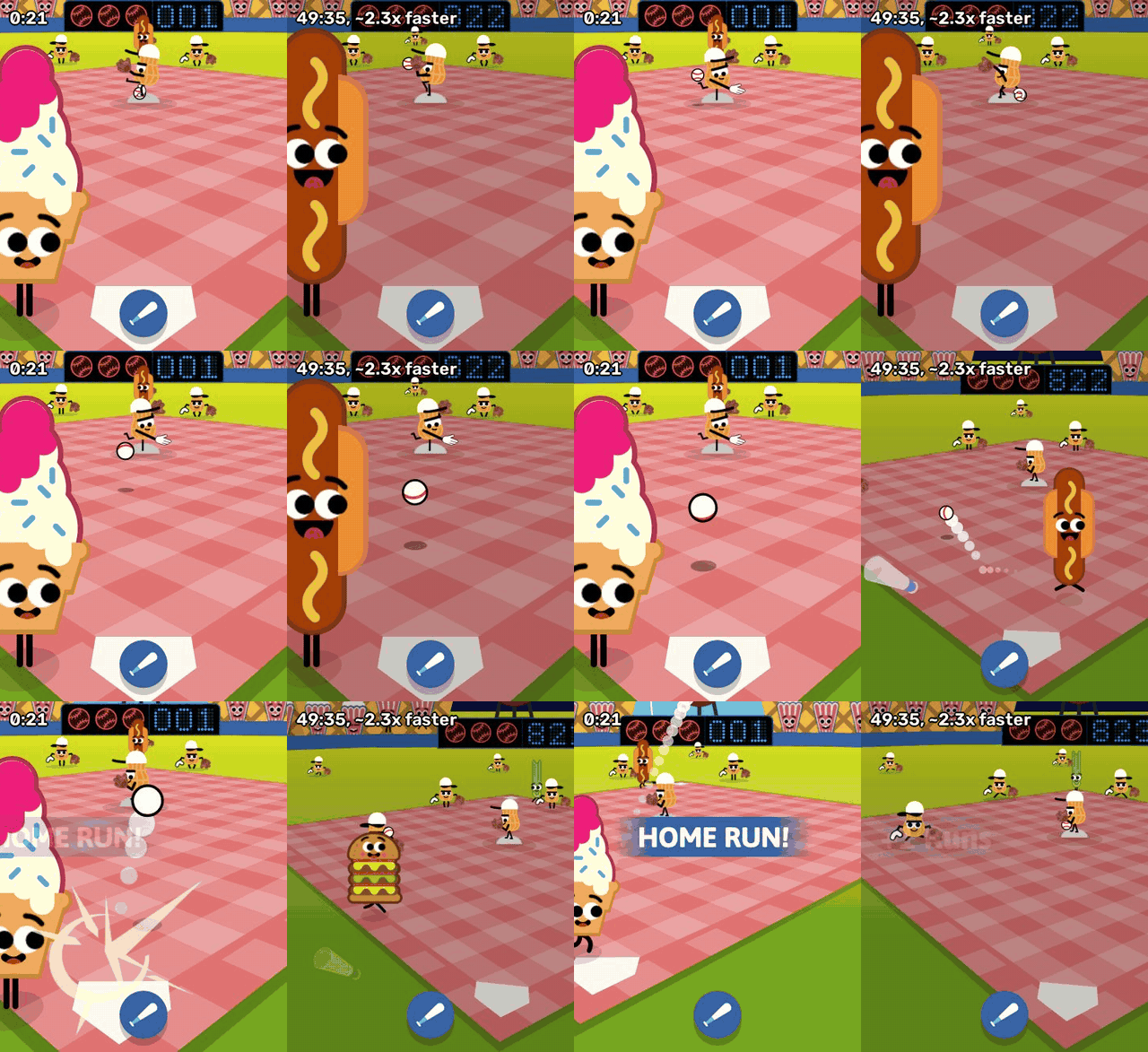
Every pitch type gets faster the longer you play: about 45% faster after six minutes. By about twelve minutes, a straight pitch that took 267 ms to cross the middle of the screen takes 117 ms, and then the speed-up stops. A fastball deep in a game is a blur.
Learning when to swing
Instead of hand-tuning rules for six pitch types at every speed, I trained a model. About 80 ms after the pitch is released, the bot gives it:
- the hat, as a color histogram (the model is never told which colors mean what),
- the ball's first 80 ms of flight: where it started, how fast it's moving and growing.
It predicts the exact moment to swing, and the bot presses space then, whether or not it can still see the ball. Some pitches are too fast to wait 80 ms for, so a second model makes the call from the very first sighting of the ball.
The model is small on purpose: boosted decision trees, depth 3. A few thousand labeled pitches is very little data for a neural net, trees retrain quickly between games, and I retrained a lot (20+ models total).
The labels came from the recordings too. For each pitch, I tracked the shadow to the plate and subtracted a lead time. Finding the right lead was its own project: by sorting thousands of swings by outcome, I found the swings that hit home runs led the plate by about 94 ms plus 0.44 times the shadow's travel time. Slow pitches want an earlier swing, fastballs a later one.
The speed-up needed one trick. Decision trees can't extrapolate; past the latest game time they trained on, their prediction just stops changing, so deep into long games the bot swung later and later. The fix was to have the model predict a speed-normalized swing time, and scale it back by the game clock at play time. That fix assumed the game speeds up forever, though, and it doesn't. That mistake shows up again below.
The most interesting part: better metrics, worse games
My offline metric was simple: how far the predicted swing time is from the label, in milliseconds. Version 12 scored 153 and 167 in real games. Versions 13 through 16 each improved that offline error. They all played worse, averaging about 110.
I had optimized a proxy, not the thing I wanted. Some changes that made the error smaller were making the real swings worse. And because every retrain overwrote the same model file, the exact v12 model was gone.
So I changed how I worked. Every model got saved by name. A small script plays two versions side by side on the same machine, game after game, and logs the scores. A new version only wins if it beats the current one in real games, not on a chart. The rebuilt v12 recipe scored 181 in its first game, beating 179. Retrained on more games (about 3,100 pitches), it hit 213.
From 213 to 999, and then the scoreboard ran out
At that point I knew the model could go much further. I stepped back and sorted every strike from the best games by why it happened. There were four kinds:
- Slow breaking balls the bot never swung at. A logic bug, not a data problem.
- Fastballs swung up to 111 ms late.
- Fastballs the shadow tracker lost. No shadow meant no label, so the hardest pitches never made it into the training data. 8% of pitches were unlabeled, but 28% of strikes were.
- Swings up to 68 ms early, deep into the game. My speed-up correction assumed the game keeps getting faster forever. It stops at about 12 minutes, so the bot was swinging for a faster pitch than the one coming.
Fixing them one at a time and retraining gave version 12.6. In its first four games it hit 999 runs every time, at around the 58-minute mark, and only stopped because my script ended every game at one hour.
999 is a hard limit. The scoreboard has three digits and just stays there. Even the game-over screen says 999. So to keep counting, I taught the bot to read the game's own "+N Runs" banners that pop up after each hit, and added them up past 999. It undercounts slightly (about 3%), so every number above 999 here is a bit low.
With the one-hour limit lifted, the games went on for hours. Version 12.6 scored 2,156 before striking out at 2 hours 6 minutes. Version 12.7, the same recipe retrained with the four hour-long games added, scored 2,664, and then 3,878.
What broke along the way
- Dusk ended my best games. About 200 seconds into a game the scene gets darker, and my scoreboard reader started seeing three lives as zero. The harness thought the game was over and quit, mid-game, on what were my best runs at the time. Lives (strikes) are now judged by shape (a lit icon has a red ring, an X doesn't) instead of brightness.
- Night broke it again. At night the stands behind the scoreboard turn dark and merge with it, and the digits dim. The game-over screen also stops changing, so Chrome stopped sending frames and the harness crashed. It now treats a frozen screen as the end of the game.
- A model I couldn't get back. See above: always save every version by name.
- Running my analysis during games made the bot worse. Crunching stats on the same laptop added about 2 ms of swing latency, enough to matter. Analysis now runs between games.
- Not every fix helps. Version 12.8 aimed fastballs 15 ms earlier, which fixed late swings deep in the game but made mid-game fastballs early. It scored 103 against 742 and was dropped. The live A/B test caught it in one round.
Where it is now
Over 90+ games, the bot has scored 20,000+ runs and 6,500+ home runs. The longest went 2,696 ft.
Since version 12.6, every strike I've looked at has been a red-hat fastball. The model's timing on red is the worst of any hat, and fixing that is the obvious next step. There's a version 12.10 trained on all 82 finished games, but it hasn't played a live game yet (I will pick this back up soon!)
The idea I started with, and still want to try, is an end-to-end model: frames in, "swing now" out, with no hand-built hat reader or shadow tracker in between. Now there's a 3,878-run baseline to beat.
Try it
You'll need Python and Chromium. It was built on Python 3.14, on a Mac (MacBook Pro, M5 Pro 24 GB).
git clone https://github.com/rishi-thak/doodlebaseball
cd doodlebaseball
python -m venv .venv && source .venv/bin/activate
pip install -r requirements.txt
playwright install chromium
python harness.py
A browser window opens and the bot starts playing. It runs the ball detector on Apple Silicon by default; on other machines set BALL_DEVICE=cpu or BALL_DEVICE=cuda. Be warned: a good game can last a few hours.